
Agent-initiated intake
Here, kovra inverts the usual creation path: instead of you creating a secret and an agent consuming it, the agent asks for a secret it needs but doesn’t have, and you fulfil it. The agent names only the coordinate — never a value — so nothing sensitive ever passes through the model’s context (I11/I14).
The flow
Section titled “The flow”- The agent requests. Over MCP it calls
request_secret(coordinate, sensitivity, description). No value is supplied; the agent gets back a request id. (At the terminal,kovra intake requestdoes the same.) - kovra queues it. The request lands in the intake broker as metadata only — a coordinate, a requested sensitivity, and the requester’s note (shown fenced as untrusted text).
- It surfaces to you. The pending request shows up wherever you look: a badge on the
macOS menu-bar app, the Dashboard, or
kovra intake list. - You fulfil it out-of-band. You type the value into a surface only a human can
summon. kovra seals it under the coordinate and clears the request.
prodis bornhigh(the request can’t lower it), and fulfilling ahighsecret is an attended action gated by an bioProve (I16). - The agent moves on. It learns the secret now exists — it never sees the value.
Why it’s safe — anti-phishing by construction
Section titled “Why it’s safe — anti-phishing by construction”The agent can only ever create a request (which bumps the badge); it can never open the fulfilment surface or read the value back. Only a human summons the entry window — the agent has no shell to open it, and a prompt-injected agent can’t fabricate the request you see, because kovra builds it from the stored fields, not from the caller. The value goes straight from your keystrokes into the vault.
Fulfil from the menulet (macOS)
Section titled “Fulfil from the menulet (macOS)”The kovra-menulet menu-bar app is the quickest path. It shows a badge with the
count of pending requests, and its menu lists them — selecting one opens a native window
to verify the coordinate and enter the value. The same menu has an “Open Dashboard…”
item that brings up the full Dashboard.
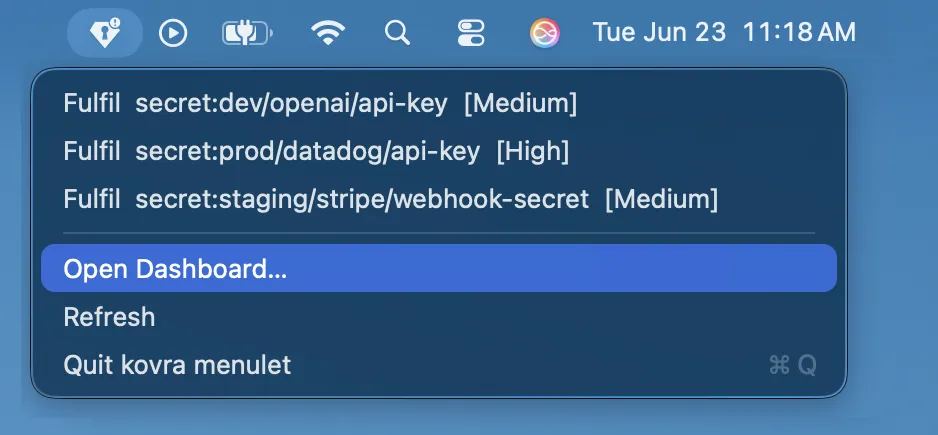
It does no vault work itself — it reads the broker and spawns kovra intake fulfill <id> --window, so the same code path (and the same Touch ID gate) runs whether you fulfil
from the menu or the terminal.
A “Start at Login” item in the same menu keeps the menulet running across reboots, so the badge is always there to catch a request — toggle it on once and macOS relaunches it at every login.
The menu-bar app is macOS-only. On Windows there’s no menulet — fulfil pending
requests from the Dashboard or with kovra intake at the terminal
(below). See Platform support.
Fulfil from the Dashboard
Section titled “Fulfil from the Dashboard”The Dashboard lists pending requests in its overview. You fulfil
one right there — type the value into the loopback page (only you can, over
127.0.0.1) and kovra seals it — or dismiss it. See
Fulfil agent requests.
Fulfil from the CLI
Section titled “Fulfil from the CLI”~ % kovra intake list1782229003-92888-0 secret:dev/openai/api-key [Medium/dev] — Agent needs OpenAI key…~ % kovra intake fulfill 1782229003-92888-0Value: ••••••••••••Sealed dev/openai/api-key (Medium).PS> kovra intake list1782229003-92888-0 secret:dev/openai/api-key [Medium/dev] — Agent needs OpenAI key…PS> kovra intake fulfill 1782229003-92888-0Value: ••••••••••••Sealed dev/openai/api-key (Medium).fulfill takes the value from a hidden prompt, or --stdin / --clipboard / --window
(the native entry window the menulet uses). kovra intake cancel <id> drops a request
without fulfilling it. See the CLI reference.
Request one as an agent
Section titled “Request one as an agent”If you’re wiring up an agent, request_secret is the tool to reach for when a value is
missing — never ask the user to paste a secret into the chat. See
kovra over MCP and the MCP tool reference.