
Dashboard
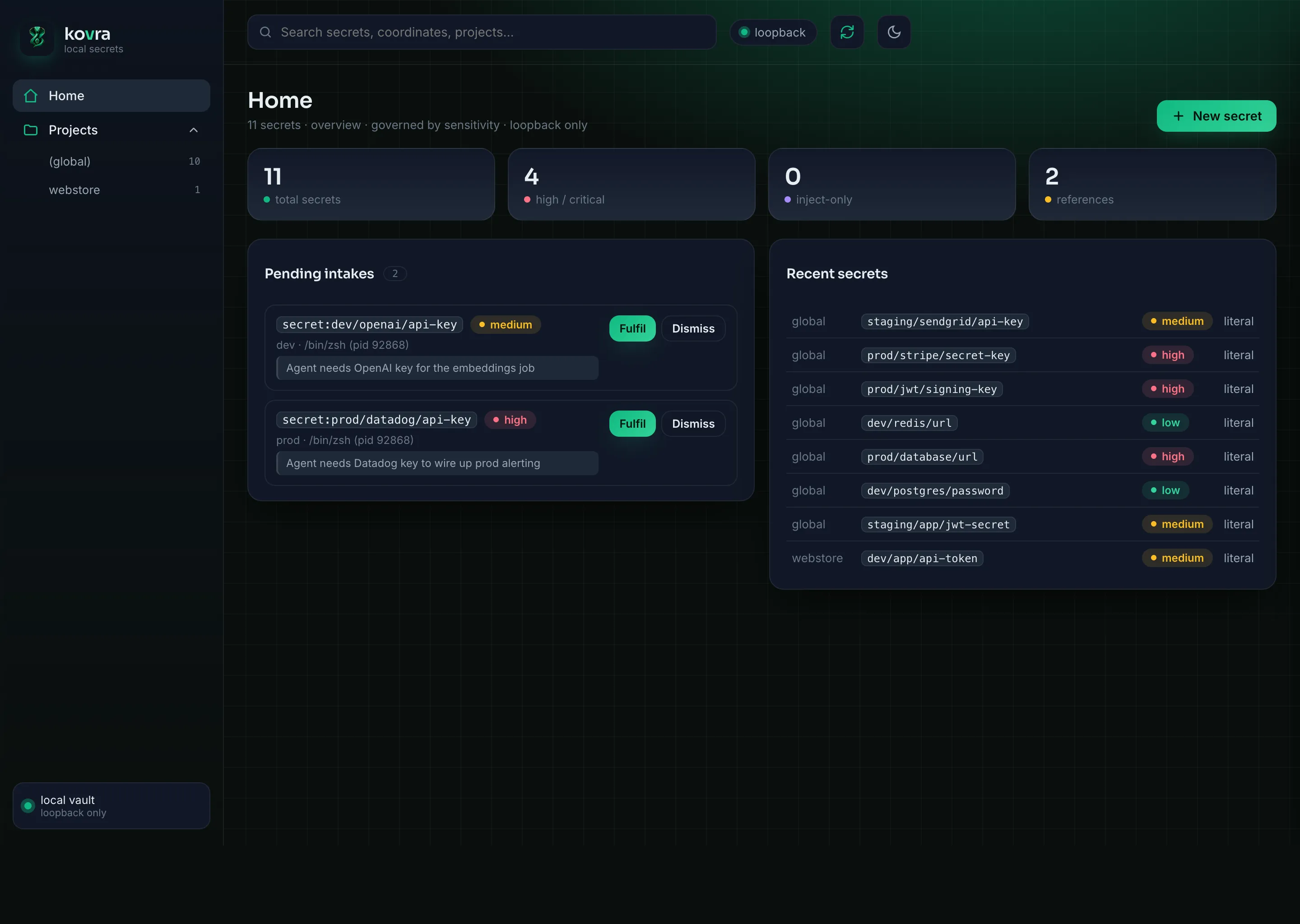
For when you’d rather click than type, kovra ships a small administration dashboard. It is on-demand and loopback-only — it isn’t a daemon, isn’t exposed to the network, and is governed by the exact same policy as the CLI and agents.
Launch it
Section titled “Launch it”You bring the dashboard up two ways — both run the same loopback server. Opening it
asks you to bioProve first (opening an admin surface is
itself a guarded action), then binds 127.0.0.1 only and mints an ephemeral session
token.
From the CLI
Section titled “From the CLI”kovra ui opens the dashboard in your browser; add --window to open it in a native
OS window (a WKWebView on macOS) instead:
~ % kovra uikovra ui → http://127.0.0.1:8731/#session=0bd48b80…(loopback only; ephemeral session; auto-shutdown after 300s idle or Ctrl-C)PS> kovra uikovra ui → http://127.0.0.1:8731/#session=0bd48b80…(loopback only; ephemeral session; auto-shutdown after 300s idle or Ctrl-C)From the menulet (macOS)
Section titled “From the menulet (macOS)”The kovra-menulet menu-bar app has an “Open Dashboard…”
item that launches the same dashboard in a native window — no terminal needed:
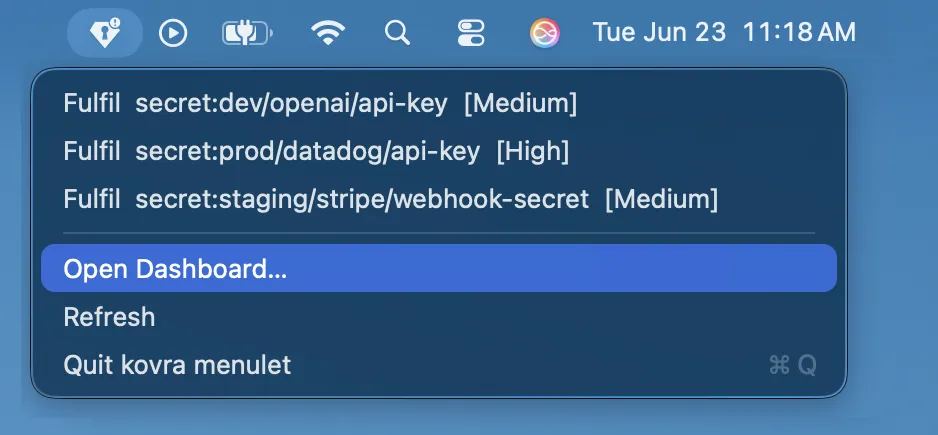
The menu-bar app is macOS-only — on Windows there’s no menulet; open the Dashboard
with kovra ui (above). See Platform support.
It shuts down on Ctrl-C or after an idle timeout (--idle, default 300s). Useful
flags: --no-open (just print the URL), --port, --no-confirm (skip the
launch gate for dev/CI/Docker; also KOVRA_UI_NO_CONFIRM), and --window (the native
window the menulet uses — the window owns the session, so the loopback server stays up
while it’s open and stops when you close it).
What it shows — and what it won’t
Section titled “What it shows — and what it won’t”The UI visualizes your vault by sensitivity: coordinates,
tiers, modes, projects, and metadata. Crucially, it never renders the plaintext
of a high or inject-only secret — those are shown masked, and the only way to
reveal them is a deliberate kovra show at the terminal. An ordinary, revealable
value (non-high, non-inject-only) can be shown inline, exactly as kovra show or
an agent’s reveal would — the boundary is the sensitivity tier, not the surface. The
same boundary that protects an agent protects the page: a browser tab is just another
surface, and the policy treats it like one.
Manage secrets
Section titled “Manage secrets”The Dashboard isn’t read-only — it’s a full administration surface for the vault, governed by the same policy as the CLI:
- Create a secret, or generate a strong random value server-side (the generated value is stored, never shown).
- Update a value, or edit metadata — sensitivity, description, the
revealableflag, or a reference. - Reveal an ordinary revealable value inline; delete a secret.
Destructive and sensitive actions take an attended confirmation per action:
deleting a secret, or lowering a secret’s sensitivity, pauses for an
bioProve (Touch ID on macOS, or kovra approve) before it
applies. A downgrade is written only on approval — a deny or timeout leaves the
record untouched. It’s the same authoritative confirmer the CLI uses; the browser
doesn’t get a weaker gate.
Fulfil agent requests
Section titled “Fulfil agent requests”When an agent calls request_secret, the pending request appears in the
dashboard — coordinate, requested sensitivity, and the requester’s note, never a
value. You fulfil it right there: type the value into the loopback page (only you can,
over 127.0.0.1) and kovra seals it under the coordinate; or dismiss it. The value goes
straight into the vault — it never passes back to the agent that asked (I11/I14).
prod is born high (the request can’t lower it), and fulfilling a high secret is an
attended action gated by the same bioProve (I16).
Keep it open — persistent mode & the lock latch
Section titled “Keep it open — persistent mode & the lock latch”By default the UI auto-shuts-down when idle. If you’d rather leave it up across a work
session, kovra ui --persistent keeps the server running until Ctrl-C — but it does
not keep your vault on screen. After --idle seconds of inactivity (default 300s;
--idle 0 disables it) the UI locks instead of shutting down:
kovra ui --persistentA locked UI is a latch — it reveals nothing. The page drops to a lock screen and the
server stops serving vault data until you re-authenticate with a fresh
bioProve; nothing sensitive is left rendered behind it.
This is the same boundary as the launch gate, applied continuously: stepping away for
--idle seconds locks the tab instead of leaving your coordinates and metadata on
screen. On macOS, locking your screen (⌃⌘Q) or letting the Mac sleep also trips the
latch — the Dashboard locks the moment you step away, not only after the --idle timeout.
Running it in Docker
Section titled “Running it in Docker”Prefer a container? kovra ui --docker runs the Dashboard from a published
kovra-ui image — Docker pulls it on first use, so there’s nothing to build
locally:
kovra ui --dockerIt keeps the same guarantees as the native UI: the master key reaches the
container only as a Docker secret in tmpfs (never baked into an image layer),
~/.vaults is mounted read-write, and the port is published on loopback only.
The launch is still gated by a bioProve unless you
pass --no-confirm. It needs Docker running on the host.